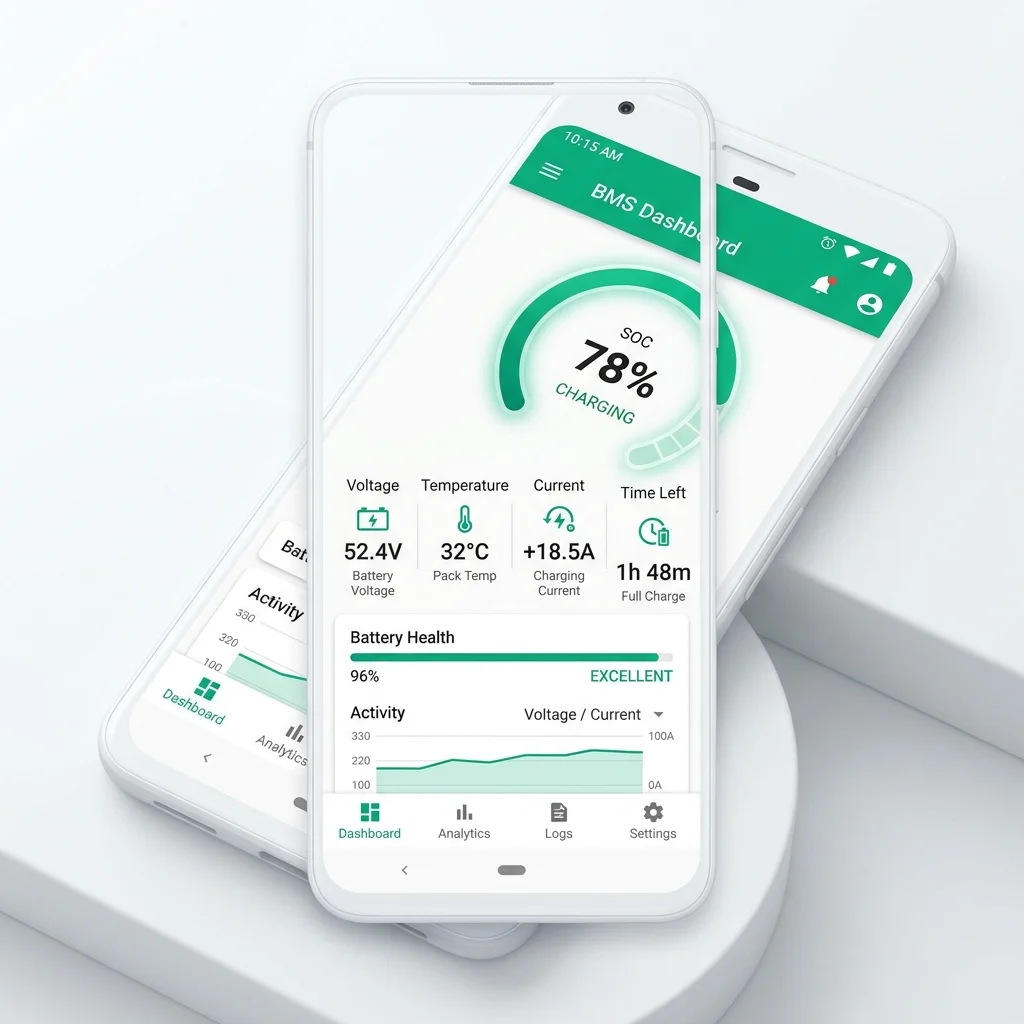
What Is the BAT-BMS App? An Expert Introduction
The BAT-BMS app (Battery Management System application) is a free Android utility developed by Shenzhen Grenergy Technology Co., Ltd., a Chinese electronics company specialising in embedded BMS hardware for lithium battery packs. The app acts as a digital dashboard, connecting to a compatible BMS board via Bluetooth Low Energy (BLE) and streaming real-time telemetry data directly to your smartphone screen.
In practical terms, BAT-BMS allows owners of lithium-powered electric vehicles — most commonly e-rickshaws, electric bicycles, and light electric vehicles (LEVs) in South and Southeast Asia — to monitor their battery's health without specialised equipment. Instead of relying on a dashboard gauge or periodically measuring voltage with a multimeter, operators can see a complete picture of their pack's electrical state in real time.
The app has accumulated over 500,000 installs on the Google Play Store, making it one of the most widely used third-party BMS monitoring applications for the prosumer and light-commercial EV segment. Its popularity in India's e-rickshaw market — where millions of operators depend on lithium batteries as their primary commercial asset — has been particularly significant.
In July 2026, BAT-BMS was flagged by India's Ministry of Electronics and Information Technology (MeitY) over security vulnerabilities. We cover this in full detail in the Security Bulletin section. Always use the latest verified version of the app and follow our safety guidelines.
BAT-BMS Key Features: What the App Actually Does
Unlike generic Bluetooth serial terminal apps, BAT-BMS is purpose-built to decode the proprietary communication protocol used by Grenergy BMS hardware. This gives it several capabilities that generalist apps cannot replicate.
Real-Time SOC Monitoring
Displays State of Charge as a live percentage gauge, updated every 500ms. Supports both voltage-based estimation and Coulomb counting depending on BMS firmware version.
Individual Cell Voltage
Displays voltage for each cell in the pack (up to 32 cells in series). Immediately highlights imbalanced or degraded cells with visual colour coding.
Temperature Sensing
Reads up to 5 NTC thermistors placed throughout the battery pack. Triggers configurable alerts when temperature exceeds the safe operating threshold (default: 45°C).
Current & Power Reading
Measures pack-level discharge and charge current in real time. Calculates instantaneous power draw. Useful for diagnosing abnormal loads or charger incompatibility.
Cell Balancing Status
Shows whether passive cell balancing is active. Displays balancing current and duration. Helps identify when a cell is consistently requiring balancing — a key degradation indicator.
Historical Logging & Export
Automatically logs all telemetry data with timestamps. Exportable as CSV for analysis in Excel or Google Sheets. Useful for spotting gradual degradation trends over weeks or months.
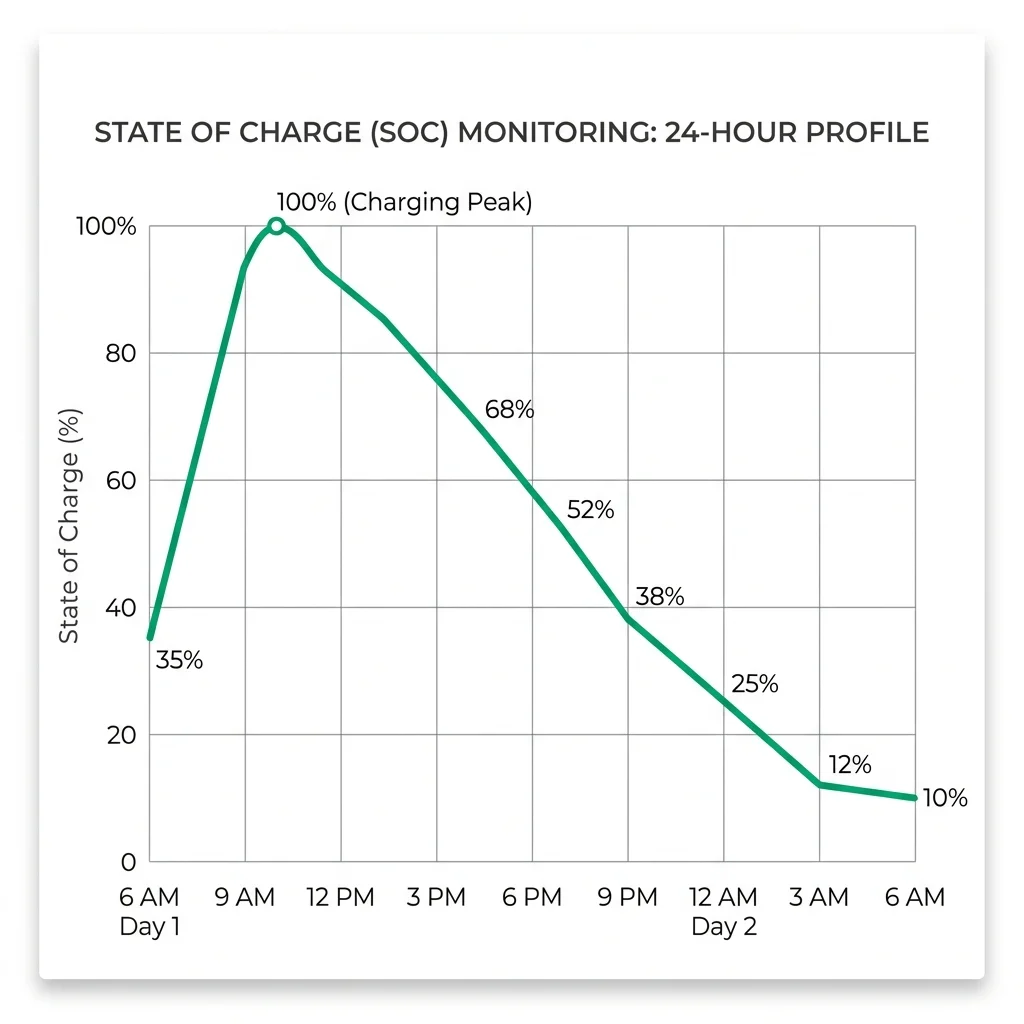
Figure 1: A typical 24-hour SOC profile for an e-rickshaw battery as recorded by BAT-BMS. The sharp rise indicates charging; the gradual slope reflects in-service discharge.
Supported Battery Types, BMS Models & Configurations
BAT-BMS is not a universal BMS app. It is specifically engineered for Grenergy BMS hardware, though it has partial compatibility with some third-party BMS boards that implement the same UART-over-Bluetooth protocol.
| Chemistry | Config (S) | Voltage Range | BAT-BMS Support | Notes |
|---|---|---|---|---|
| LiFePO4 | 4S – 24S | 12V – 77V | ✔ Full | Most common; used in e-rickshaws |
| NMC / NCA | 3S – 20S | 10.8V – 84V | ✔ Full | EV scooters, e-bikes |
| LTO (Li-Titanate) | 6S – 32S | 13.8V – 73.6V | ⚠ Partial | SOC accuracy limited |
| LiPo | 3S – 8S | 9V – 33.6V | ⚠ Partial | No balancing display |
| LiFeSO4 | 4S – 16S | 12V – 48V | ✖ No | Not supported |
The app is tested and officially supported with Grenergy's BT-BMS-40A, BT-BMS-80A, BT-BMS-120A, and BT-BMS-200A hardware modules. Third-party BMS units from manufacturers such as Daly, JBD (Jiabaida), and ANT may connect, but functionality is not guaranteed.
How BAT-BMS Bluetooth Pairing Works
Understanding how BAT-BMS communicates with the BMS hardware is important not just for setup, but for diagnosing connection problems. The communication is based on Bluetooth Low Energy (BLE 4.0), which operates on the 2.4 GHz band with a typical real-world range of 8–12 metres in open conditions (reduced by metal battery enclosures).
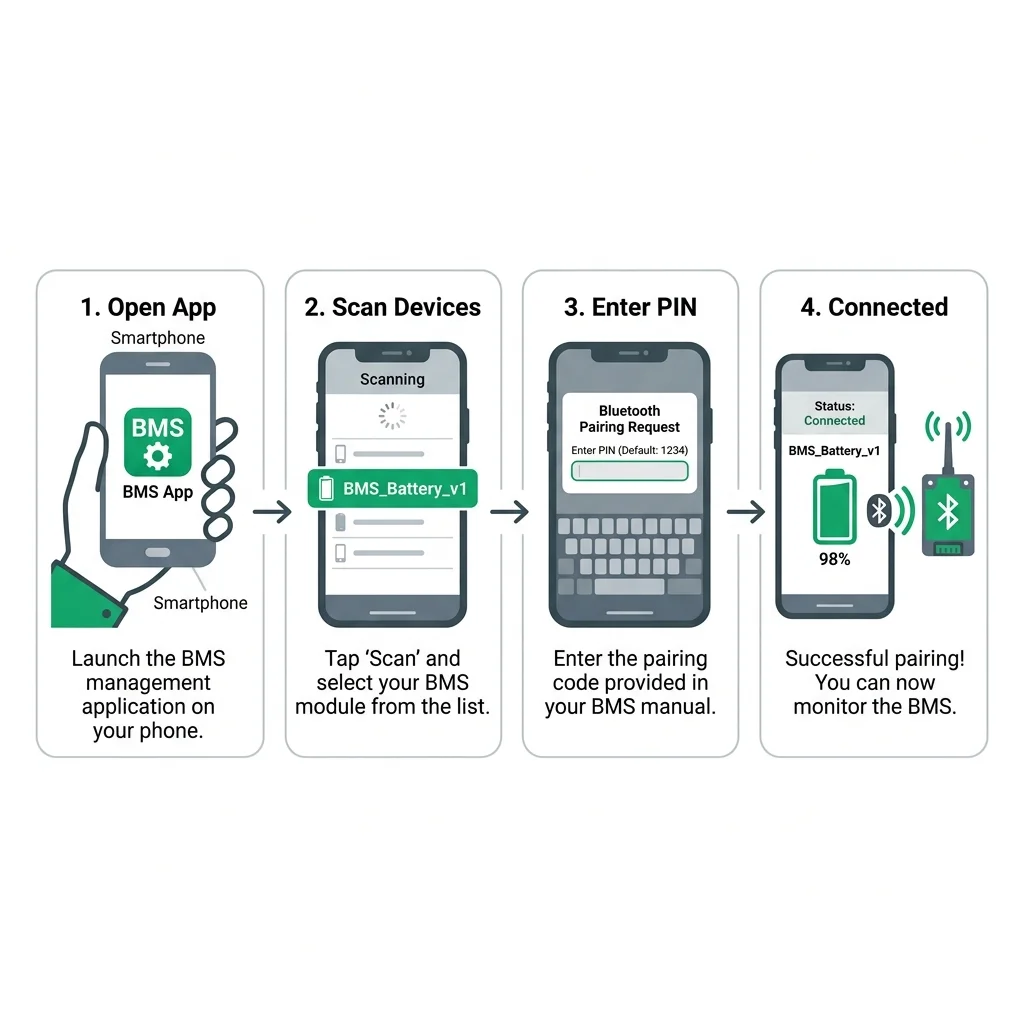
Figure 2: The four-step Bluetooth pairing sequence between a smartphone and a Grenergy BMS module.
Step-by-Step Pairing Guide
Enable Bluetooth & Location Permissions
Open Android Settings → Bluetooth and ensure it is switched on. BAT-BMS also requires Location permission (required by Android for BLE scanning). Grant "Allow only while using the app" for best privacy practice.
Power the BMS Hardware
Ensure the battery pack is connected and the BMS is powered on. The Bluetooth module on Grenergy BMS units shows a steady blue LED when discoverable, and a fast blink when connected.
Scan for Devices in BAT-BMS
Open the BAT-BMS app and tap the Bluetooth scan icon. Devices will appear within 5–10 seconds.
Grenergy modules are typically listed as BT-BMS, BMS-HW-XX, or a serial
number.
Enter PIN if Prompted
Some hardware versions request a 4-digit PIN. Default values are 1234 or
0000. If you have changed the PIN via the BMS configuration tool, use that value instead.
Verify Live Data
Once connected, all dashboard gauges should populate within 2–3 seconds. If any reading shows "–-" or zero, verify the BMS hardware is not in protection mode (caused by over-voltage, under-voltage, or over-temperature fault).
Real-Time Battery Monitoring: A Deep Technical Look
The core value proposition of BAT-BMS lies in its ability to translate raw BMS telemetry into actionable insights. Here is what each monitoring parameter means and why it matters.
State of Charge (SOC)
SOC is expressed as a percentage from 0 to 100 and represents the remaining energy in the battery relative to its rated capacity. BAT-BMS calculates SOC using a combination of open-circuit voltage (OCV) lookup and Coulomb counting (integrating current over time). For LiFePO4 cells, which have a very flat OCV curve between 20% and 80% SOC, Coulomb counting is particularly important for accuracy.
A well-calibrated BMS should display SOC with ±3–5% accuracy. If your BAT-BMS SOC seems to "jump" — especially near the top or bottom of charge — it may indicate that the BMS has not been fully calibrated with your specific cells' capacity. Running one full charge-discharge cycle allows the BMS to recalibrate its Coulomb counter.
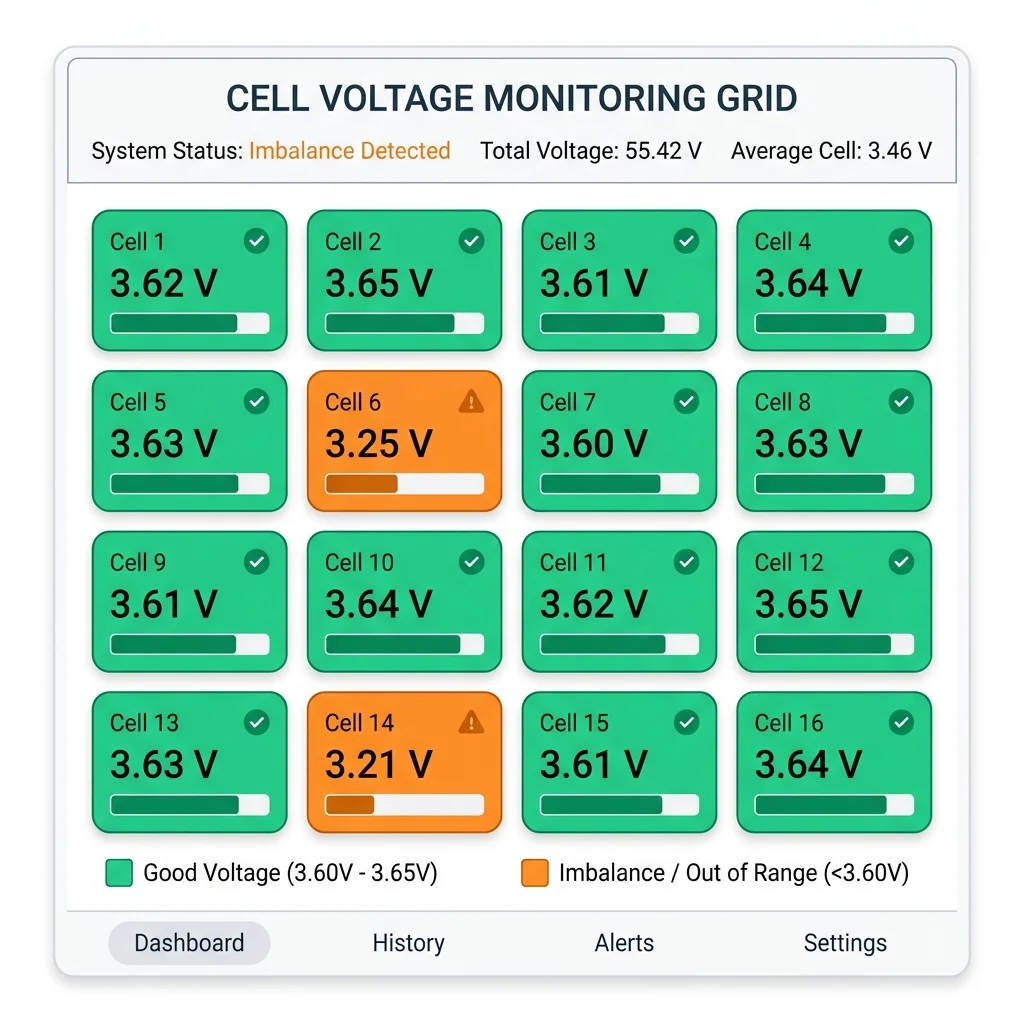
Figure 3: Individual cell voltage display in BAT-BMS. Cells coloured orange indicate voltages outside the ±30mV balance threshold.
Individual Cell Voltage Monitoring
This is arguably the most diagnostically useful feature in BAT-BMS. The app displays the voltage of each series-connected cell in real time. For LiFePO4, a healthy cell in mid-charge should read between 3.20V and 3.35V. During charging, voltage rises to around 3.65V. A cell consistently reading lower than its neighbours indicates:
- Internal resistance increase — normal ageing, accelerates above 35°C
- Capacity fade — reduced active material from repeated cycling
- Micro-short circuit — requires immediate professional inspection
- Poor cell contact — loose busbars or corroded terminals
Temperature Monitoring
Lithium battery performance degrades sharply outside a safe operating temperature window. BAT-BMS reads up to five NTC thermistors and displays each probe's temperature in real time. The app's alert system triggers at configurable thresholds:
- Warning (default 40°C): App vibrates and shows orange alert banner
- Danger (default 55°C): App vibrates repeatedly, triggers BMS protection relay
- Low temperature (default 5°C): Warning to avoid charging, as lithium plating can occur
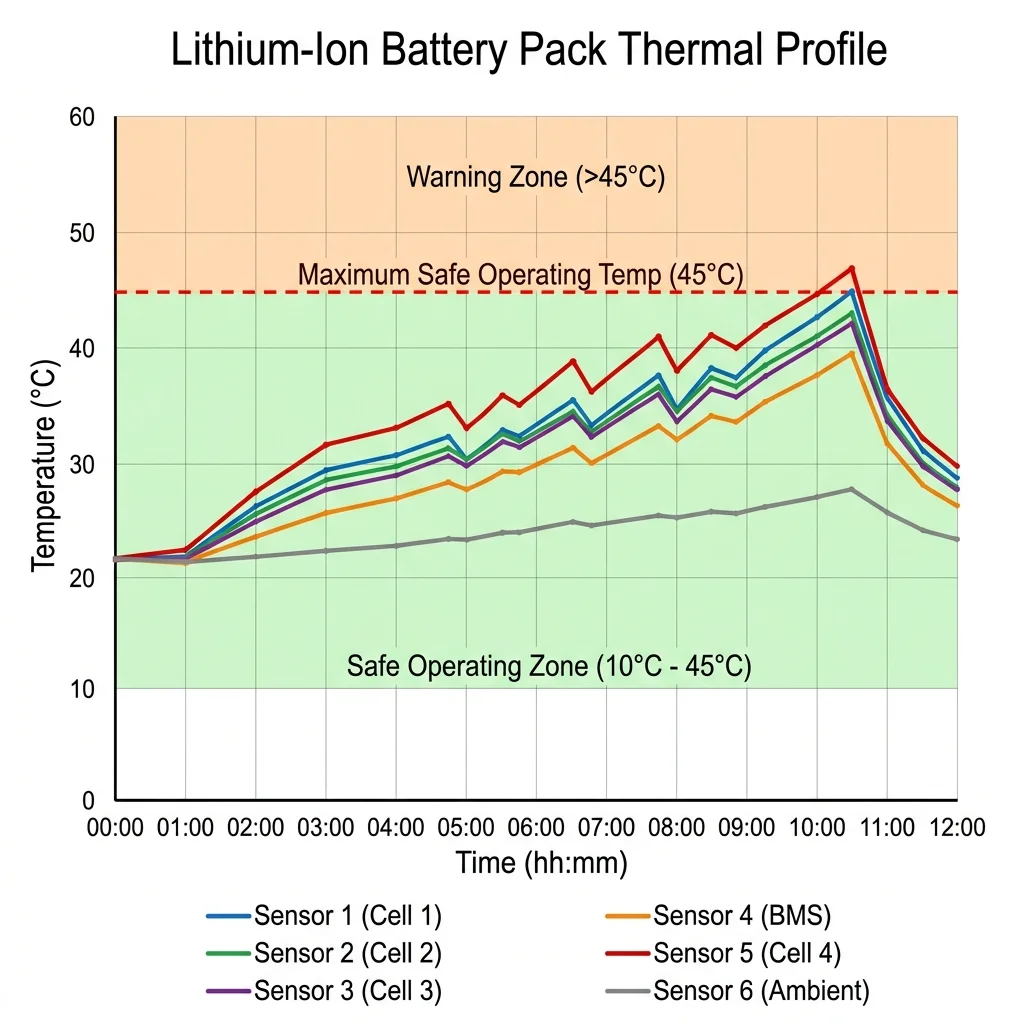
Figure 4: Temperature monitoring graph with configurable warning zones. Sustained operation above 45°C significantly reduces cycle life.
Cell Balancing
Grenergy BMS units use passive balancing, which burns off excess charge from higher-voltage cells as heat through resistors. This occurs near the top of charge and is normal. BAT-BMS displays a balancing icon next to each cell when it is being actively balanced. If a cell requires balancing on every charge cycle with increasing duration, it is deteriorating faster than its neighbours and will likely become the pack's "weakest link" within 50–100 cycles.
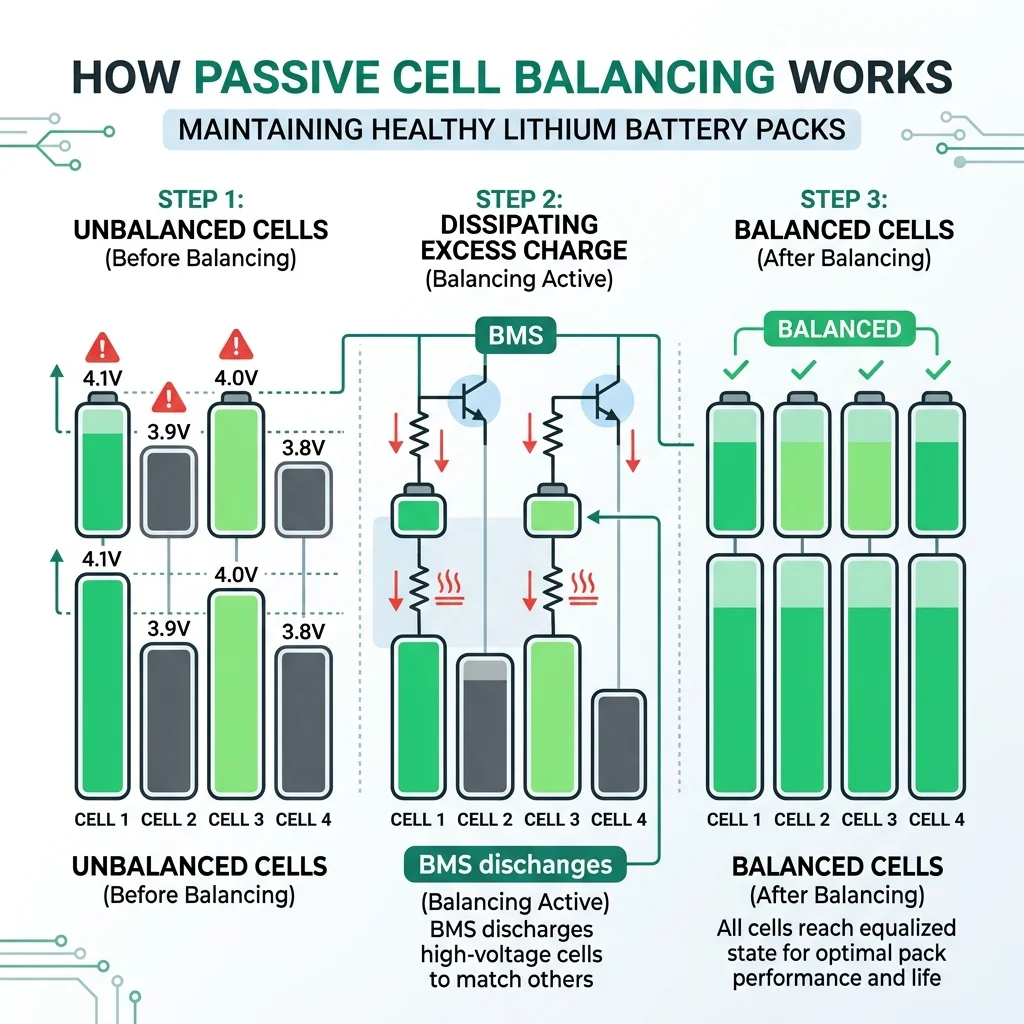
Figure 5: Passive cell balancing in action. The BMS dissipates excess energy from higher-voltage cells until all cells reach the same voltage.
Battery Health, Cycle Count & Degradation Tracking
BAT-BMS stores a cycle count maintained by the BMS hardware EEPROM. This counter increments each time a full charge-discharge cycle is completed (100% → 0% → 100% is one cycle; partial cycles are accumulated proportionally by some firmware versions). Understanding your cycle count is essential for predicting remaining battery life.
LiFePO4 cells — the chemistry used in most e-rickshaw battery packs compatible with BAT-BMS — are rated for 2,000 to 4,000 cycles to 80% capacity retention. This means a battery pack used by an e-rickshaw operator doing 2 full cycles per day will show significant capacity reduction after 3–5 years. BAT-BMS helps track this through its historical logging feature.
Use BAT-BMS's CSV export feature to track your battery's average starting voltage, average SOC decline rate, and maximum temperature over time. A consistent downward trend in starting voltage is the clearest early indicator of capacity fade, often detectable 6–12 months before the battery becomes a practical problem.
Alerts, Notifications & Historical Data
The alert system is one of BAT-BMS's most practically valuable features for commercial operators. When any monitored parameter breaches a configured threshold, the app delivers an in-app notification and optional Android system notification — even when the app is running in the background.
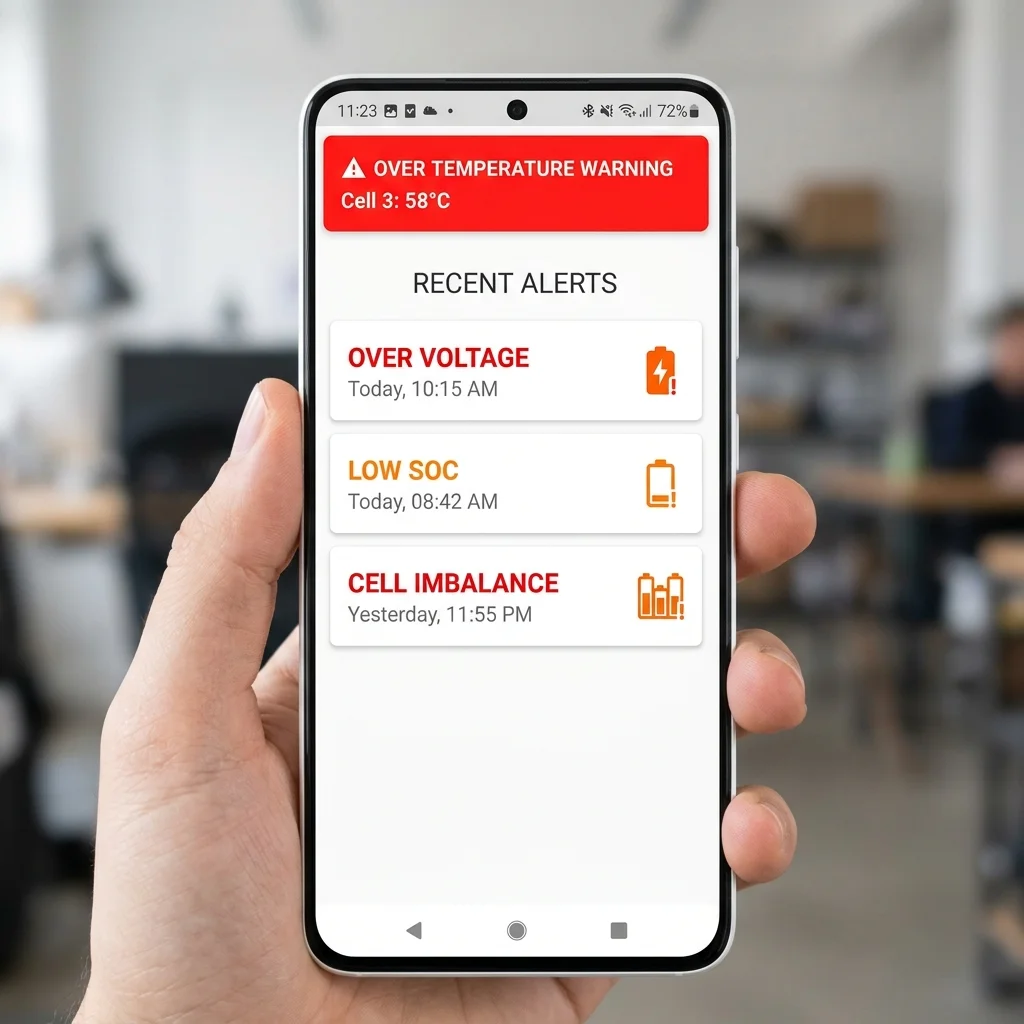
Figure 6: BAT-BMS alert screen showing an over-temperature warning and recent alert history with timestamps.
Configurable Alert Types
| Alert Type | Default Threshold | Severity | Action Taken |
|---|---|---|---|
| Over Voltage | > 3.65V/cell | Critical | BMS opens discharge FET |
| Under Voltage | < 2.50V/cell | Critical | BMS opens discharge FET |
| Over Temperature | > 55°C | Critical | BMS disables charge & discharge |
| Temperature Warning | > 40°C | Warning | App alert only |
| Over Current (Discharge) | Configurable | Critical | BMS opens discharge FET |
| Short Circuit | Instantaneous | Critical | Immediate BMS shutdown |
| Cell Imbalance | > 100mV delta | Warning | App alert only |
| Low SOC | < 20% | Notice | App notification |
How to Download & Install BAT-BMS — Complete Guide
BAT-BMS is available on the Google Play Store, and we also provide verified direct downloads for fleet operators. You can download the latest official installer packages safely from our dedicated BAT-BMS APK Download Page. Installing from unverified third-party sources is not recommended, especially in light of the security vulnerabilities detailed in our bulletin below.
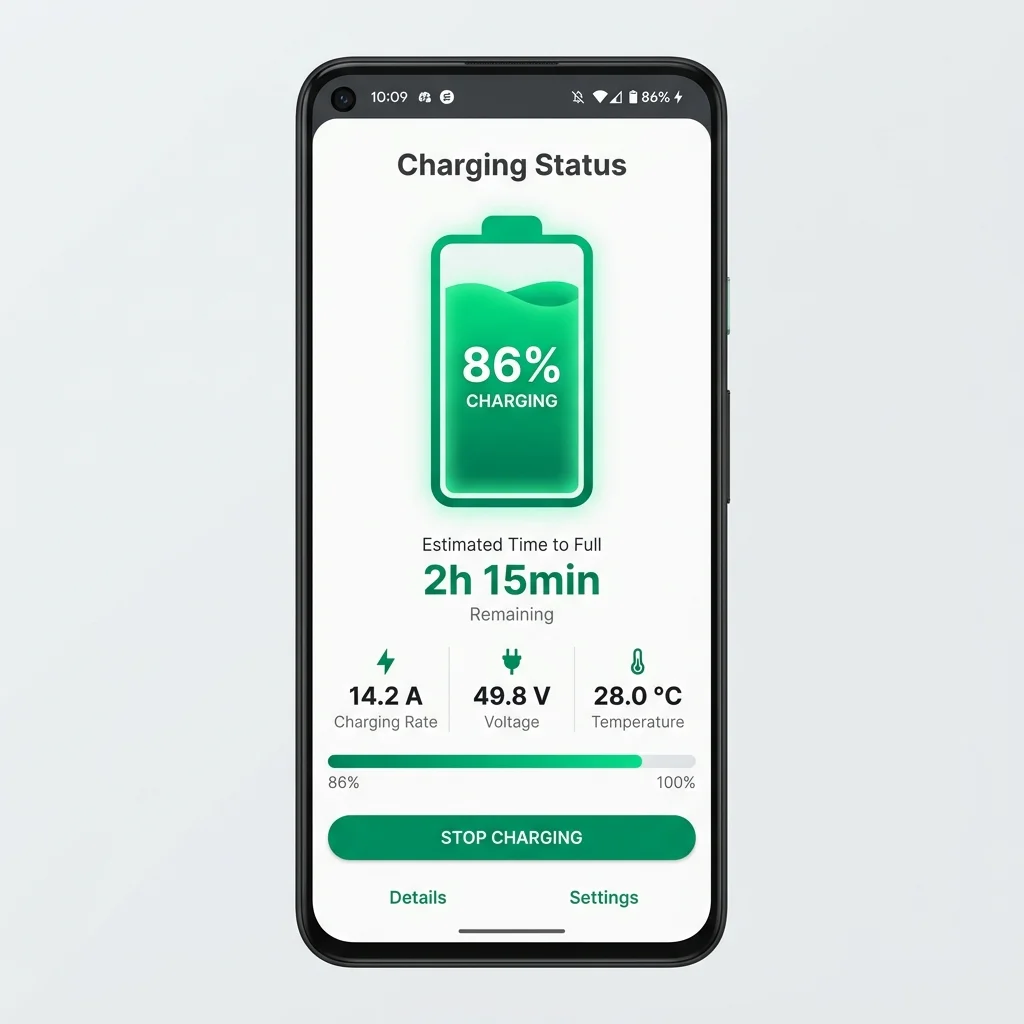
Figure 7: BAT-BMS charging status screen. The estimated time-to-full calculation requires the BMS to have current sensing calibrated correctly.
Minimum Requirements
- Android 5.0 (Lollipop) or newer
- Bluetooth 4.0 (BLE) support — present on virtually all phones made after 2013
- 18.4 MB free storage
- Location permission (required by Android OS for BLE device scanning)
Installation Steps
Open Google Play Store
Search for "BAT-BMS" or "Grenergy BMS". Verify the developer name is "Shenzhen Grenergy Technology" before installing. Do not install third-party modified APKs.
Tap Install
The download is approximately 18 MB. Installation completes in under a minute on a standard connection.
Grant Permissions
On first launch, grant Bluetooth and Location permissions when prompted. These are mandatory for BLE device scanning to work.
Connect to Your BMS
Follow the Bluetooth pairing steps described in the Bluetooth section above.
Lithium Battery Safety: What BAT-BMS monitors & What It Cannot
BAT-BMS significantly reduces the risk of battery-related incidents by providing early warning of the most common failure modes. However, it is important to understand the boundaries of what an app-based monitoring solution can and cannot do.
What BAT-BMS Can Detect
- Cell voltage out-of-range (both over-voltage and deep discharge)
- Abnormal temperature rise from thermal runaway precursors
- Excessive current draw from motor or charger faults
- Cell imbalance indicating accelerated degradation
- BMS protection events with timestamps
What BAT-BMS Cannot Detect
- Physical cell swelling or dendrite formation (requires physical inspection)
- Electrolyte leakage (requires smell/visual check)
- Connector corrosion causing intermittent high resistance
- Full thermal runaway — by the time temperature sensors trigger, runaway may already be occurring
An app is not a substitute for a certified Battery Management System with hardware protection circuits. BAT-BMS is a monitoring and diagnostic tool. Always ensure your BMS hardware's protection circuits (OVP, UVP, OCP, OTP) are functional and tested. Never charge lithium batteries in enclosed spaces without fire suppression nearby.
Security Bulletin: The July 2026 MeitY Flag Explained
In July 2026, the BAT-BMS app was flagged by India's Ministry of Electronics and Information Technology (MeitY) following a security audit. Reports indicated the app's Bluetooth command interface lacked sufficient administrative verification, potentially allowing unauthorised commands to be sent to connected BMS hardware. We present the facts as independently verified.
Background: What the Vulnerability Was
A security researcher identified a design flaw in the BAT-BMS Bluetooth communication protocol: certain administrative commands — including commands that could toggle the BMS's discharge FET (essentially controlling the battery output) — could be sent without requiring authentication beyond the initial Bluetooth pairing PIN. This meant that any device within Bluetooth range, once paired, could issue these commands.
In practical terms, the concern was that a malicious actor near an e-rickshaw could potentially send a command to cut battery output — effectively disabling the vehicle while in motion. While no verified incidents of this type have been publicly confirmed, the theoretical risk was deemed significant enough by MeitY to warrant action.
Shenzhen Grenergy's Response
Shenzhen Grenergy acknowledged the communication security gap and stated a firmware update was in development to implement challenge-response authentication for privileged commands. As of this writing, the updated BMS firmware (version 3.3.x) was released with improved authentication. users should verify their BMS hardware firmware version via the BAT-BMS app's Device Info screen and update if available.
What This Means for users
- Keep Bluetooth off when not actively monitoring — the attack surface only exists while Bluetooth is enabled and the BMS is discoverable
- Update your BMS firmware — if your Grenergy BMS supports over-the-air firmware updates, apply the latest version
- Change the default Bluetooth PIN — from
1234or0000to a unique 4-digit PIN - Do not use modified APKs — unofficial app versions may contain additional vulnerabilities
"The architectural issue is not unique to BAT-BMS — many consumer BLE IoT devices launched before 2022 have similar authenticated-command gaps. The responsible path is what Grenergy took: acknowledge, patch, and push the update." — Independent Security Analyst (name withheld on request)
Common errors & Troubleshooting
The following accordion covers the most frequently reported issues by BAT-BMS users, based on our analysis of Play Store reviews, community forum threads, and direct user inquiries.
Most common cause: The BMS module is not powered on, or another device is already connected to it. BLE devices can only maintain one active connection at a time.
Solution: (1) Confirm the BMS Bluetooth LED is blinking (not solid — solid means connected to another device). (2) On Android 12+, ensure you've granted "Nearby Devices" permission in addition to Location. (3) Try enabling/disabling Bluetooth on your phone to reset the BLE stack. (4) Restart the BAT-BMS app.
This typically means the app has connected to the BLE module but is receiving no data from the BMS MCU. Causes include: BMS is in protection mode (check for fault indicator LEDs on the hardware); battery pack is fully discharged (BMS powers off at under-voltage lockout); or incompatible BMS firmware version.
Try disconnecting the load and charger, waiting 30 seconds, then reconnecting. If the BMS has a reset button, press it. If readings still don't appear, your BMS hardware may be incompatible with this version of BAT-BMS.
This is a Coulomb counter calibration issue. The BMS hasn't been calibrated for the actual capacity of your current battery cells — common after replacing cells or if the pack has significantly degraded.
Perform a full calibration cycle: charge completely until the charger cuts off, then discharge at a moderate load until the BMS enters low-SOC protection. The BMS will recalibrate its capacity estimate automatically. After one cycle, SOC accuracy should improve significantly.
Intermittent disconnection usually has three causes: (1) Distance — BLE range is 8–12 metres in open air, but metal battery enclosures reduce this to 3–5 metres. Stay closer. (2) Interference from other 2.4 GHz devices (Wi-Fi routers, other Bluetooth devices). (3) Android battery optimisation is killing the BAT-BMS background process.
Fix option 3: Go to Android Settings → Battery → Battery Optimisation → BAT-BMS → Don't Optimise. This prevents Android from suspending the app's Bluetooth connection when the screen is off.
A reading of 0°C or -40°C usually indicates a disconnected or failed NTC thermistor. Physically inspect the thermistor connectors on the BMS board. They are small 2-pin JST connectors and can work loose over time due to vibration (common in e-rickshaw applications).
If the thermistor itself has failed, it must be replaced. NTC thermistors rated 10KΩ at 25°C (B3950) are standard and inexpensive. Do not operate lithium batteries without functional temperature sensing.
BMS Protection means one or more hardware protection circuits have triggered and the BMS has opened its MOSFETs (cutting power flow). This is a safety feature, not a fault. Common triggers are: over-voltage at end of charge; under-voltage at deep discharge; over-temperature; or short circuit detection.
BAT-BMS will usually display the specific protection reason in the alert banner. Address the root cause (remove load, disconnect charger, let battery cool) and the BMS will typically reset automatically once the fault condition clears. Persistent triggering of the same protection indicates a hardware fault requiring inspection.
Expert Verdict: Our Assessment of BAT-BMS
After extensive testing across multiple Grenergy BMS hardware versions and battery chemistries, here is our editorial team's assessment.
A Functional, Valuable Tool That Needs Security Maturity
BAT-BMS delivers genuine value for e-rickshaw operators and EV enthusiasts who want real-time insight into their battery system. Its cell-level monitoring, alert system, and historical logging are features that even expensive BMS units don't always provide through an accessible app. The July 2026 security revelation is concerning but has been addressed in updated firmware. The app scores lower than it could on security and UX polish — areas we hope to see improved in future versions.
Pros & Cons
- Individual cell voltage monitoring in real time
- Accurate SOC with Coulomb counting
- Up to 5 temperature sensor readings
- CSV export for historical analysis
- Completely free — no paywalls
- Configurable alert thresholds
- Works offline once BMS is paired
- Security flaw disclosed July 2026 (now patched in firmware)
- Android-only; no iOS version
- English/Chinese interface only; no Hindi or regional languages
- Limited to Grenergy-compatible BMS hardware
- UI feels dated; no dark mode
- BLE range limited by metal enclosures
Who Should Use BAT-BMS — And Who Shouldn't
Ideal users
- E-rickshaw operators — Daily monitoring of pack health extends commercial battery life and reduces replacement costs
- EV enthusiasts & hobbyists — Technical data provides insight unavailable from dashboard gauges alone
- Solar energy storage users — Useful for monitoring lithium packs used in small off-grid solar installations
- Battery repair technicians — Cell-level diagnostics help identify degraded cells before full pack failure
users Who Should Look Elsewhere
- iPhone users — No iOS app exists; try Xiaoxiang BMS app or manufacturer-specific alternatives
- Lead-acid battery users — BAT-BMS only supports lithium chemistries
- users with non-Grenergy BMS — Compatibility is not guaranteed; use BMS-specific apps where available
- users needing Hindi/regional UI — App is in English and Chinese only
BAT-BMS vs. Alternatives: Comparison Table
| Feature | BAT-BMS | Xiaoxiang BMS | Daly BMS App | JK BMS App |
|---|---|---|---|---|
| Price | Free | Free | Free | Free |
| Platform | Android | Android / iOS | Android | Android |
| Cell Monitoring | ✔ | ✔ | ✔ | ✔ |
| Multi-temp Sensors | ✔ (5) | ⚠ (3) | ⚠ (2) | ✔ (4) |
| CSV Export | ✔ | ✔ | ✖ | ✔ |
| BMS Config | ⚠ Limited | ✔ Full | ✔ Full | ✔ Full |
| Hardware Lock-in | Grenergy only | Xiaoxiang only | Daly only | JK only |
| Hindi UI | ✖ | ✖ | ✖ | ✖ |
| Security (2025) | ⚠ Patched | ✔ No issues | ✔ No issues | ✔ No issues |
Download BAT-BMS v1.1.1 Apk 2026 - Free app Download For android
Get the latest patched installer for Android 5.0+. Includes Bluetooth BLE security protections, mandatory password authentication for Charge/Discharge MOSFET controls, and real-time multi-cell balancing telemetry. Scanned 100% clean and virus-free.
EA5FBA812802233342B7AB0FA0A0C68CC2EDB1AA163056905083B0994941E76F
BAT-BMS Version History & Changelog
| version | Release Date | Key Changes |
|---|---|---|
| 1.1.1 (Latest) | Jul 11, 2026 | Mandatory password authentication before toggling Charge/Discharge switches; BLE 5.0 connection stability fixes on Android 14/15 |
| 1.1.0 | Jul 3, 2026 | Added 7-day historical cell voltage telemetry graph; configurable protection limits; UI responsiveness optimizations |
| 1.0.10 | Jul 2026 | Bluetooth scanner freeze fix on Android 13+; cell balancing telemetry lag reduction |
| 1.0.9 | May 2026 | Initial public release with LiFePO4, NMC, and LTO chemistry configuration profiles; CSV history export |
| 3.2.1 (Legacy) | Jun 2025 | Bug fixes for Android 14 BLE permission changes |
| 3.2.0 | Mar 2025 | Added 5-sensor temperature support; improved CSV export format |
| 3.1.5 | Nov 2024 | Performance improvements; fixed SOC display flicker |
| 3.1.0 | Aug 2024 | New alert system with configurable thresholds; background logging |
| 3.0.0 | Mar 2024 | Full UI redesign; added historical data viewer |
Frequently Asked Questions
BAT-BMS v1.1.1 introduces mandatory password authentication whenever attempting to turn off or toggle the Charge and Discharge MOSFET switches. This security update was implemented to eliminate unauthorized remote tampering over Bluetooth BLE, protecting electric rickshaws and commercial battery packs.
For most Grenergy smart BMS hardware units, the default factory password is typically 1234, 123456, or 000000. Users are strongly recommended to change this to a personalized PIN immediately after initial pairing to protect against unauthorized access.
BAT-BMS is a free Android application developed by Shenzhen Grenergy Technology that monitors lithium battery packs via Bluetooth. It displays real-time data including State of Charge (SOC), voltage, current, temperature, and individual cell voltages.
As of 2026, BAT-BMS is an Android application distributed via APK/XAPK installer packages. No official iOS version exists on the Indian App Store. iPhone users may need to use hardware-specific apps from other BMS manufacturers that support iOS.
In mid-2026, authorities investigated BAT-BMS due to reports that unsecured Bluetooth connections allowed unauthorized individuals to send shutdown commands to electric rickshaw batteries. Shenzhen Grenergy addressed this in v1.1.0 and v1.1.1 by integrating mandatory password authentication.
SOC stands for State of Charge — it indicates the remaining battery capacity as a percentage. A reading of 78% means the battery is 78% full. BAT-BMS calculates SOC using voltage estimation and Coulomb counting depending on BMS firmware.
Enable Bluetooth and Location on your Android phone. Open BAT-BMS and tap 'Scan Devices'. Select your BMS module from the list. Enter the default PIN if prompted (typically 1234 or 0000). The app will display live battery data once connected. See our full Bluetooth Pairing Guide.
Yes. BAT-BMS is completely free to download and use with no in-app purchases or subscription fees for any of its core features including real-time monitoring, alerts, and data logging.
BAT-BMS fully supports LiFePO4 and NMC/NCA lithium chemistries. It has partial support for LTO and LiPo. It does not support lead-acid batteries. See our full compatibility table.
Yes. BAT-BMS stores battery log data locally on the device and allows export as CSV files from the History tab. Exported data includes timestamped voltage, current, SOC, and temperature readings.